Lirik Lagu Sinopsis Film Gaya Hidup
BBCODE TO HTML HTML TO BBCODE Y Z A
Klasemen L.Italia Klasemen L.Inggris Jadwal Liga Italia Jadwal Liga Inggris
Resto Enak di Jakarta Resto Romantis di Jkt Hokben Delivery Bakmi GM Delivery PHD - Pizza Hut
Showing posts with label TIPS AND TRICK MOBILPHONE. Show all posts
Saturday, March 27, 2010 | 12:23 AM | 0 Comments

Totorial Create aplication handler page2

7. Select the file Handler.doc , and check the box Legal Blackline , then click Compare .


8. Then a new Document will pop-out, the BLUE colored text, are the added codes by handler. You may also see the texts that he added or deleted.


FINISH


d20dd15atv1.png
Windiffallsystem.zip


d20dd15atv1.png
JDgui-0.3.2.windowsPC.zip


d20dd15atv1.png
JDgui-0-1.3.2.osx.i686PC.zip


d20dd15atv1.png
JDgui-0.3.2.linux.i686.tarPC.zip


Good luck and success!


¤¤¤PREVIOUS¤¤¤
Thursday, March 25, 2010 | 5:24 PM | 0 Comments

Totorial Create aplication handler

Equipment needed:
[+] PC Tools
-Windiff
-JD GUI
- MS Word 2003 or later
- Winrar
- Midlet (HandlerMod & Unmodded jar file)


Steps:
1. Using Winrar , extract the midlets, HandlerMod and the Unmodded.


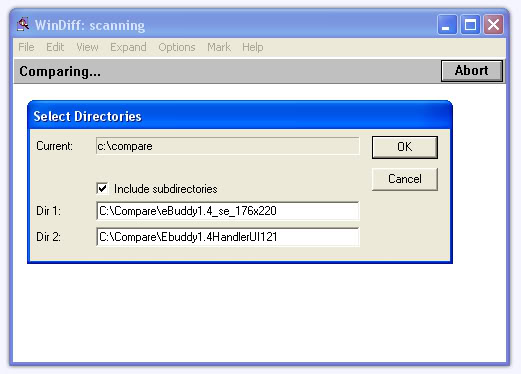
2. Open Windiff , goto File, Compare Directories , then in the textbox Dir 1 , put the Unmodded midlet folder path , while on the Dir 2 , the Handlermod folder path , click OK.


3. Now this is the result, the lines that has RED is different , while the BLACK is identical.


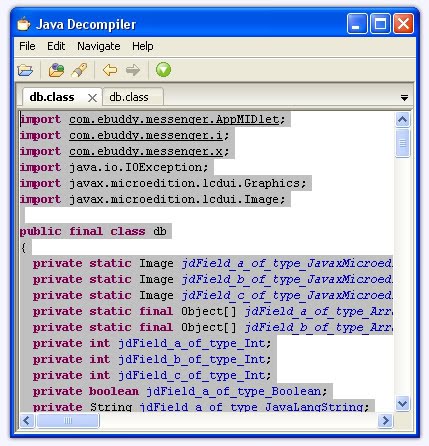
4. Now we are about to disect the codes, lets say, the db.class , open JD-GUI , then open the db.class of HandlerMod folder , and the db. class Unmodded folder of . Select all the texts( source code ) by pressing CTRL+A and CTRL+C , and paste it on Microsoft Word , do the same with the other one.


5. We should have the 2 codes pasted in Microsoft Word ( db.class source code of HandlerMod folder and db.class source code of Unmodded folder ), now save this file as Handler and unmodded, or which ever filename you like.


6. Open the Unmodd.doc , goto Tools, Compare & Merge Documents.


¤¤¤NEXT PAGE¤¤¤
Friday, March 19, 2010 | 9:31 AM | 0 Comments

SPECIFICATIONS AND WAYS OF KNOWING YOU PHONE RATES.


sometimes we want to know how our phone screen size in terms of installation applications and games, new prices and second, please click below.

NB: YOU LIVED TYPE YOUR PHONE IN THE BOX"SEARCH THE ARCHIVE" EXAMPLE IF WANT TO KNOW YOUR SPECIFICATIONS NOKIA E63 WRITE "E63"


ENTER HERE

TRICK WEBCAM FOR YOUR PHONE


Magic camera phone into a webcam mobile capital, you can also save money. provided that you use the handphone to S 0 windows mobile blackberry, or Symbian, you do not need to buy a webcam. camera mounted on the body of the phone can be used for web camera. course, the standard conditions of the factory to convert the camera phone so the web cam is not possible. you need special software designed to transmit pictures from phone to computer and PC as if there simulation new webcam installed
on your computer. mobiola web camera that make service. MWC to capture an image through microsoft active sync.successful image MWC captured abandoned softwar reply sent to the access needs a webcam. MWC to install a driver. This driver serves to deceive third-party software into thinking that the camera phone as a USB-based webcam. Please download mobiola web camera.


d20dd15atv1.png
WEBCAMS60V3FULL.zip

Inspiration by: fajardd layar95


*******

Application where MESSAGE AND FILE TO DRIVE E NGAGE S60V2.


Are you S60V2 mobile phone users especially NGage QD or classic? On the phone there are deficiencies in terms of which the message has not been able in the switch to driveE, so we will have a hard time if you receive files, such as mp3 or capacity game that his application exceeds its size of phone memory. Without the help of computers we will have a hard time right?. Install this application on your mobile phone driveE, so that the problems mentioned above will be solved. NB: to get the message that the old inbox (phone's memory) can be read again in your MMC with easy application, once installed and restrat mobile MsgDriveE you by first copying a folder mail that is on drive C: with the File Manager. Then go to another folder Mail wrote in driveC: copy "Index" and all of its paste, or just replace the Mail folder MMC / drive E:. do not forget "index" was also not forget the paste. Now that you've managed to read all the old messages that had been in his drive C.


d20dd15atv1.png
MSGDRIVeEforS60V2.zip


*******
Thursday, March 18, 2010 | 11:39 PM | 0 Comments

Removing Viruses Without Format tasted S60v2


The virus is always annoying, but sometimes a provision for service workers. Today I will give a simple trick to remove the virus without mobile phone format. I discussed this trick for Symbian Special 60, ( 6600.7610 etc) 602nd (N70, 6680 etc) Let's get started:
1. Install fileman, or similar applications. Install in C and E. (more easy to use x-plor)
2. Open C: \ system \ apps (in this folder to where the virus activity, usually apps folder contains only the folders of installed applications. Well, if there is a file outside the folder with the extension ". SIS" and ". EXE" or ". MDL "is suspect as a virus. Usually these files can not be deleted. How do I delete it? Continue No. 3 ..
3. Rename the folder "Apps" in "C: \ system \ Apps", (just minus one letter only). Then try deleting the virus files earlier. But when you rename the folder apps, it will automatically appear Apps folder with the name again, there is another virus in the new Apps folder. But no matter, let it alone. Because they can not be deleted as well.
4. Open the folder c: \ system \ bootdata. Delete the file "firstboot. dat"
5. Open the folder c: \ system \ data.Hapus file "aplication.dat"
6. Turn off the phone, remove the memory. Colokin to the card reader, right click the drive memory search with the keyword ". Exe", ". MDL". If meet filename title MDL exe and delete it directly. 7. Connect your mmc, turn on the phone. Open fileman, remove the APPS folder in c: \ system \ Apps. (no virus folder before, now can be deleted).
8. Return home again we rename the folder was "APP" to "APPS" again.
9. Done
10. Additionally, for the virus guardian, find the folder named guard or guardian in the C and E, if met press option, attribute sets off all but the sub-folders on. Then delete foder guardian mentioned. With this way mobile data did not join the other lost.


I hope usefully
*******
 
Copyright yokohimasite © 2010 - All right reserved - Using yokohima'site
Best viewed with Mozilla, IE, Google Chrome and Opera.